Free
Paper Minimal
Gaming · Minimal
Type your channel name once and watch 240 YouTube banner templates update instantly. Preview any template on a channel page, fine-tune it in the editor and download a 2560×1440 banner that’s ready to upload.
Every template below updates live. Nothing is uploaded or saved.
240 templates · all free, no watermark
Gaming · Minimal
Vlog · Cute
Beauty · Dark
Tech · Neon
Education · Retro
Music · Luxury
Anime · Minimal
Kids · Cute
Fitness · Dark
Food · Neon
Gaming · Cute
Vlog · Dark
Beauty · Neon
Tech · Retro
Education · Luxury
Music · Minimal
Anime · Cute
Kids · Dark
Fitness · Neon
Food · Retro
Gaming · Dark
Vlog · Neon
Beauty · Retro
Tech · Luxury
Browse by niche
Start from a niche that matches your content. Every set of banner templates for YouTube comes in six styles and four color moods, so you’ll find a look that fits without starting from scratch.
Neon, dark and arcade looks with room for your stream schedule and Discord.
24 templatesWarm, airy layouts for travel, daily life and lifestyle channels.
24 templatesSoft pastels and editorial luxury for makeup and skincare creators.
24 templatesClean grids and circuit textures for reviews, coding and setups.
24 templatesClear, readable designs for tutors, explainers and study channels.
24 templatesSoundwaves, stage lights and lo-fi moods for artists and producers.
24 templatesManga halftones, sakura pastels and bold outlines for anime fans.
24 templatesBright, friendly and playful banners for family and kids content.
24 templatesHigh-energy type and bold contrast for workout and wellness channels.
24 templatesAppetizing colors for recipe, baking and cooking channels.
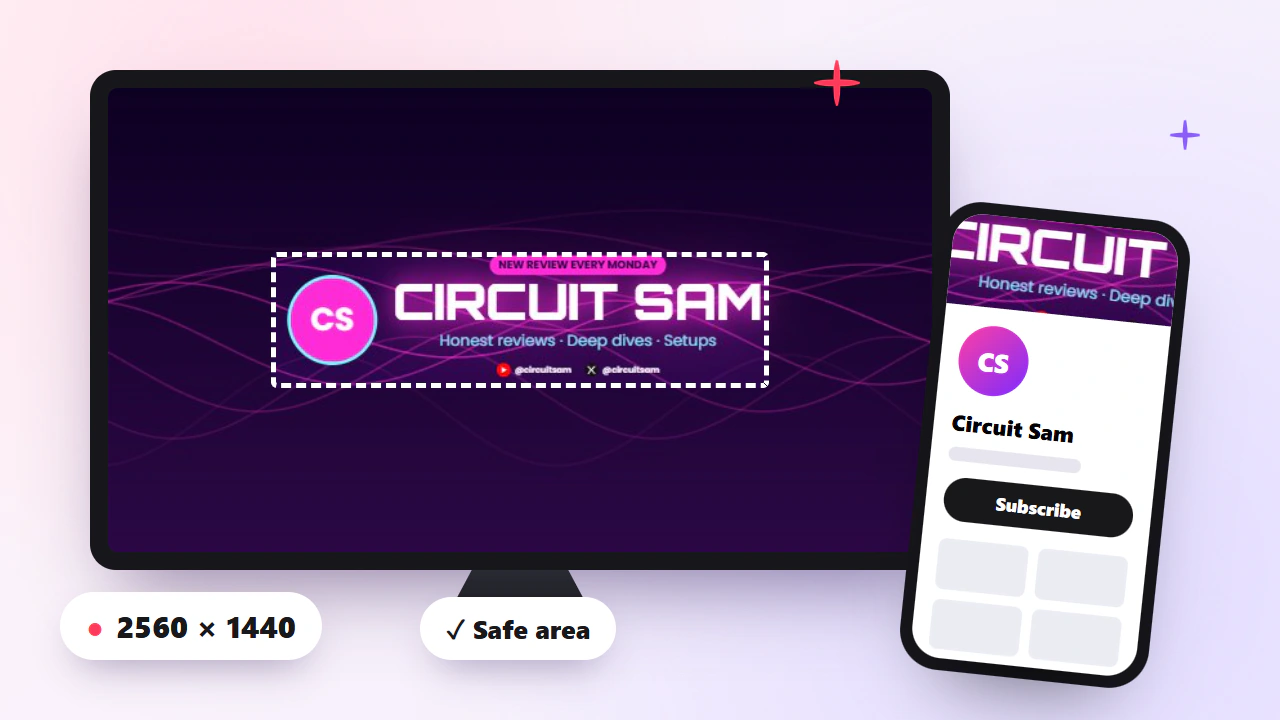
24 templatesDesigning in Photoshop, Photopea, GIMP or Canva? Download a 2560×1440 guide that marks exactly what TV, desktop, tablet and mobile show, so your channel name never gets cropped.
Free for personal and commercial use. A link back is appreciated but never required.
How it works
Enter it once at the top. Every YT banner template in the gallery redraws with your name and social handle, so you can judge designs as they’ll really look.
Open any template to see it on a simulated channel page with your avatar, then switch between desktop, mobile and TV to check what gets cropped.
Download a 2560×1440 PNG right away, or open the template in the editor to change text, colors, fonts, logo, social icons and upload schedule.
Really free
Many “free” YouTube banner templates ask for a subscription, an account or add a watermark at the very last step. Here’s what you get instead.
| Feature | This page | Typical sites |
|---|---|---|
| Download with no watermark | Often paid | |
| No account needed to download | Usually required | |
| Exact 2560×1440 size, under 6 MB | Varies | |
| Safe-area check for mobile and TV | Rarely | |
| Live preview with your channel name | Rarely |
Design tips
Visitors decide in seconds. Pair your channel name with a short tagline like “Honest tech reviews” so new viewers instantly know why they should subscribe.
Most viewers see only the central 1546×423 strip. Keep the name, face or logo there and treat everything else as background.
Reuse the same two or three colors and one font across banner, avatar and thumbnails. A consistent look makes your channel recognizable in search and recommendations.
An upload schedule such as “New videos every Friday” sets expectations and gives returning viewers a reason to check in.
FAQ
Everything about using, editing and uploading these YouTube banner templates.
Yes. Every template on this page is free to download and use on personal or monetized channels. There’s no attribution requirement and no hidden fee at export.
No. Every YT banner template downloads as a clean 2560×1440 image with no watermark or logo added, and you don’t need an account to download.
YouTube recommends 2560×1440 pixels, at least 2048×1152, and a file under 6 MB. The safe area that shows on every device is the central 1546×423 pixels. Every banner template for YouTube here is built to these specs.
Open YouTube Studio, go to Customization > Branding, click Upload next to Banner image, choose your downloaded file and confirm the crop preview, then click Publish.
Yes. The blank safe-area template is available as a layered PSD that opens in Photoshop, Photopea and GIMP, plus PNG and transparent-overlay versions for Canva and other tools.
Phones only show the middle 1546×423 strip of the 2560×1440 image. Use the Mobile preview and the safe-area toggle to make sure your name and logo sit inside that strip before you upload.
Yes. Click Customize on any template to open the editor, where you can upload a logo or background photo, change colors and fonts, and add social icons and an upload schedule.
Not finding the right YouTube banner template? Open the YouTube banner generator to start from scratch, upload your own background and fine-tune every layer with live safe-area guides.